
My Boy! - GBA Emulator
Pixel Respawn LLCArcade
4.17.37K Reviews
- Version
- Varies With Device
- Installs
- 1.00M
- Age Rating
- Everyone
Screenshots
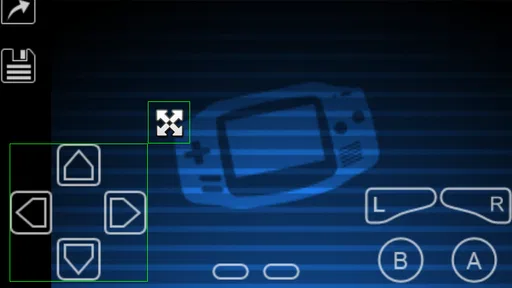
Our Review of My Boy! - GBA Emulator
 Analysis by Appyee
Some apps feel exciting for an afternoon and then disappear into the folder where old downloads go to rest. A handheld emulator has a tougher test: it needs to make a familiar game comfortable to play on a phone, then stay useful when the nostalgia wears off. I find My Boy! - GBA Emulator most appealing when I already know which Game Boy Advance game I want to revisit and can picture making room for it in my regular routine.
This is an arcade-style game utility from Pixel Respawn LLC, built around playing Game Boy Advance titles on a mobile device. It has been around since Aug 12, 2012, and its continued audience suggests that the idea still has practical appeal. The challenge is less whether a phone can bring back the look and feel of a handheld game, and more whether its controls, setup, and everyday convenience suit the way you actually play.
The first week: nostalgia meets a phone screen
The opening sessions can be especially satisfying if you have a particular game in mind. On a phone, a portable library is easy to reach during a quiet break, a commute where you are seated, or an evening when you want something more focused than scrolling through short videos. The familiar format can make a few minutes feel like a proper gaming session rather than another disposable distraction.
There is a practical point worth considering before you settle in: an emulator is not the same thing as a catalogue of games. My Boy! is designed to run GBA games, but you should think about how you will organize and access the games you intend to play. A little preparation can prevent the first session from turning into a hunt through files, especially if you have a large collection or switch between devices.
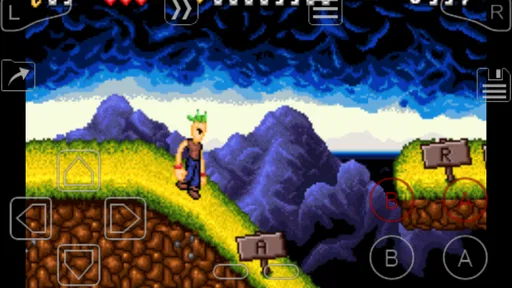
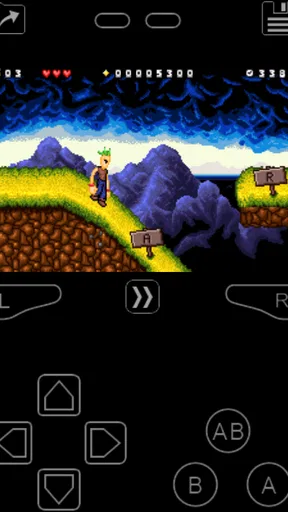
On-screen controls are also a real adjustment, even when they can be customized. A phone has no physical buttons, and the feel of a touchscreen can vary with the game: menus and turn-based actions tend to be more forgiving than precise platforming or rapid inputs. I would try a short, low-pressure session first, then adjust the control layout before committing to a long level. That small step is more useful than assuming the default arrangement will suit every game and every grip.
The purchase price is $4.99, so this is a paid choice rather than a free experiment. That makes the first week a good time to judge the basics honestly: does the screen feel comfortable, do your games run as you expect, and do you want to return to them after the first burst of nostalgia? The app is rated for Everyone, while the games themselves can vary in tone, so I would still choose titles with the player in mind.
What keeps it useful after the novelty fades
I judge its lasting value less by the first rush of revisiting GBA games and more by whether it makes returning to one particular save easy enough to become a habit. Keeping a small, organized selection and using quick saves thoughtfully can make spare moments feel rewarding instead of turning play into file management. That everyday rhythm also makes it easier to notice when touchscreen controls or an old game’s pacing start to wear thin.
Making short sessions work
The strongest everyday case is not necessarily an hours-long replay. It can be a saved game waiting for a few minutes of attention while dinner is in the oven, during a quiet lunch break, or while waiting for an appointment. Saving and loading at different points gives mobile play a flexibility that a traditional handheld session does not always have. I find that especially helpful for games with long stretches between natural stopping points: you can pause your own progress around your day instead of letting the game dictate the length of a session.
Fast-forwarding can help with repetition, but I would use it selectively. It is useful when retracing a familiar section or moving through dialogue you already know; it is less appealing when a game depends on timing, careful observation, or a soundtrack you want to enjoy. Treating it as an occasional convenience rather than a permanent speed setting helps preserve the original pacing. It can also make a game feel less rewarding if every slow part is skipped, so the best use is targeted rather than automatic.
How it compares with other ways to play
Compared with carrying original hardware, a phone is easier to keep nearby and can make returning to an old save less of a production. The trade-off is tactile: a touchscreen cannot reproduce the certainty of dedicated buttons, and the phone is still a phone, with notifications and other distractions close at hand. If physical controls matter more to you than portability, original hardware or a suitable controller-based setup may be a better fit.
Compared with choosing a different emulator, My Boy! makes most sense if you want a focused GBA experience and value features such as link cable emulation. The store average is 4.0 from around 59,000 ratings, and the game has more than a million installs. Those figures show a substantial audience, but they cannot tell you whether a particular game, phone, or control layout will suit you. I would make that decision based on the games you want to play and how comfortable you are with touch controls.
Keep the setup simple and dependable
A small amount of organization can make the app easier to return to. Keep the game files you use in a clearly named place, avoid making several near-identical copies, and check that a save belongs to the game you think it does before removing or moving files. This is especially useful if you like to alternate between titles: a tidy collection reduces the chance that a spare moment gets spent figuring out where you left off.
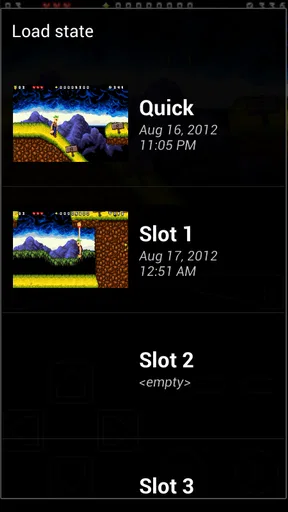
Save states are convenient, but I would not rely on a single one as the only record of a long playthrough. When the game offers its own save system, using that as well gives you a more conventional checkpoint alongside the quick-resume option. The practical trade-off is that extra saves require a little housekeeping; the benefit is a safer way to experiment, revisit a difficult section, or keep separate progress for different play sessions.
Link cable emulation is a distinctive reason to consider this particular GBA tool, especially if multiplayer is part of what you remember. It is worth checking that the other player’s setup can work with yours before planning a gaming session around it. A feature can be compelling in principle and still be less useful than solo play if coordinating devices becomes a chore. For someone who mostly plays alone, this capability is a bonus rather than a reason to buy.
Where fatigue can set in
Touchscreen play is the clearest recurring compromise. Long sessions can feel less comfortable than a dedicated handheld, while a cramped control layout can make demanding sections frustrating. A larger phone screen may help with visibility, but it does not turn glass into physical buttons. If your favorite games depend on quick, precise inputs, try a short session before deciding that the convenience outweighs the control difference.
There is also a difference between liking the memory of a game and wanting to play it again. Older games can ask for repetition, patience, or a slower pace that no emulator feature can change without changing the experience. Fast-forward and flexible saving can soften those demands, but they cannot make every title suit a modern, stop-and-start routine. I would choose one game you are genuinely curious to finish rather than loading a large collection and expecting the sheer number of options to keep you engaged.
Who gets lasting value from it
My Boy! is best for someone who already has a clear reason to return to GBA games, is comfortable managing a game collection, and accepts touchscreen controls as a practical compromise. It can also suit a player who wants brief sessions, appreciates the option to save at convenient moments, or hopes to explore link cable play with a compatible setup. The app has 7,300 reviews alongside its broad rating base, but personal fit matters more than popularity when the core experience depends on your preferred games and controls.
I would steer away from it if you are expecting a ready-made library, dislike virtual buttons, or mainly want a modern mobile game designed around short touch interactions. It is also not the obvious pick for someone who wants to avoid setup entirely. For those players, original hardware or a different kind of arcade game may be more satisfying. The $4.99 cost is easier to justify when you expect repeated use, not just a single evening of nostalgia.
Overall, this is a focused way to revisit a particular era of handheld gaming, with convenience and flexible play sessions on its side and touch controls as the main compromise. I would give it space on my phone if I had a GBA game I truly wanted to continue, rather than treating it as a novelty collection to browse once. Its Everyone age rating makes the app suitable for a broad audience, though parents should still consider the content of the individual games being played.
Getting Started with My Boy!
First things first, downloading and setting up My Boy! - GBA Emulator is a breeze. It's available on both Android and iOS, making it super accessible, whether you're team Android or an Apple aficionado. The app is lightweight, so it won’t hog your phone's storage, which is always a plus.
Once you've got it installed, the interface is clean and intuitive. Everything is laid out in a way that even if you’re a total newbie to emulators, you’ll find your way around in no time. The first thing I noticed was how customizable the controls are. You can literally map every button to your liking, making the gaming experience as smooth or as challenging as you want it to be.
Performance and Features
Now, onto the juicy bits — performance. One of the standout features is its speed. The emulator runs games flawlessly, with no noticeable lag. Whether you're playing an action-packed title or a slower-paced puzzle game, it handles everything with ease. The developers have done a stellar job ensuring compatibility with a wide range of GBA games, so your favorites are likely to run without a hitch.
Another cool feature is the ability to save and load games at any point. Remember those tricky levels you could never get past as a kid? Well, now you can save right before that boss battle and reload as many times as you need to finally claim victory. It’s like having superpowers!
Visuals and Audio
Visually, My Boy! delivers a crisp and clear display of your favorite games. The graphics are sharp, and you can even tweak settings for enhanced visuals if you’re feeling adventurous. As for the audio, it’s spot-on. The iconic soundtracks and effects come through beautifully, capturing the essence of the original games perfectly.
"It's like bringing the GBA back to life, but in your pocket!"
Additional Goodies
One feature that I found particularly handy was the fast-forward option. Let’s face it, some games can drag a bit, especially during repetitive dialogues or when grinding for levels. With the fast-forward feature, you can speed things up and get back to the action.
Also worth mentioning is the ability to link up with other devices for multiplayer gaming. So if you have friends who are also on the nostalgia train, you can connect and share the experience, just like the good old days.
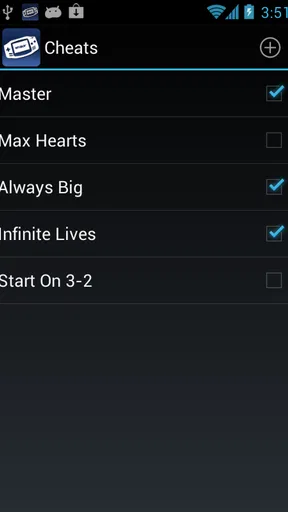
For those who love tinkering, the app offers cheat code support. Remember those secret codes you used to scribble down? They’re back and ready to be used to give you that extra edge in your favorite games.
Final Thoughts
To wrap it up, My Boy! - GBA Emulator is a fantastic app for anyone looking to relive their Game Boy Advance memories. It’s user-friendly, packed with features, and performs like a dream. Whether you’re a die-hard fan of retro gaming or someone new looking to explore the classics, this emulator is a must-try.
If you’re itching to dive back into the world of GBA games, I’d say give My Boy! a shot. It’s like opening a time capsule, but way more fun!
Verdict
Strengths of My Boy! - GBA Emulator
- Fast emulation speed, no lag during gameplay.
- Supports link cable emulation over Bluetooth.
- Customizable controls enhance user experience.
- Syncs with Google Drive for easy backup.
- High compatibility with most GBA games.
Limitations of My Boy! - GBA Emulator
- Ads can be intrusive in free version.
- Limited features without the paid version.
- Some advanced settings require technical knowledge.
- Occasional crashes on older devices.
- No multiplayer support on iOS devices.
Other Releases by Pixel Respawn LLC
View All
My OldBoy! - GBC Emulator
Arcade4.1
Similar Picks in This Category
View All
Subway Surfers
SYBO Games4.6

Stickman Party 234 MiniGames
PlayMax Game Studio4.6

Subway Princess Runner
Ivy4.4

Temple Run
Imangi Studios4.2

Zombie Tsunami
Mobigame SAS4.6

Stack Ball - Crash Platforms
CASUAL AZUR GAMES4.5
Frequently Asked Questions
What is My Boy! - GBA Emulator?
My Boy! - GBA Emulator is a powerful and efficient emulator that allows you to play Game Boy Advance games on your Android device. It offers a variety of features including fast emulation, high compatibility, and a user-friendly interface. This makes it a popular choice for gamers who wish to relive their favorite GBA games on modern devices.
How do I install and set up My Boy! - GBA Emulator?
To install My Boy! - GBA Emulator, simply download it from the Google Play Store. Once installed, you will need to load GBA ROMs onto your device. These ROMs are the game files that My Boy! will run. After loading your ROMs, you can configure the settings to optimize performance and start playing your favorite games.
Is My Boy! - GBA Emulator free to use?
My Boy! offers both a free and a paid version. The free version provides basic functionalities, while the paid version offers additional features such as save states, fast forward, and no ads. The paid version can be purchased within the app or from the Google Play Store, providing a more seamless gaming experience.
What devices are compatible with My Boy! - GBA Emulator?
My Boy! - GBA Emulator is designed for Android devices. It boasts high compatibility and should work on most smartphones and tablets running Android. However, for optimal performance, a device with decent processing power and memory is recommended to ensure smooth gameplay without lag.
Is it legal to use My Boy! - GBA Emulator?
Using My Boy! - GBA Emulator itself is legal, but the legality of using ROMs can vary. It is generally legal to use ROMs if you own an original copy of the game. However, downloading ROMs of games you do not own may violate copyright laws. Always ensure you comply with local regulations when using ROMs.
Play our best games!


